<?xml version="1.0" encoding="utf-8"?>
<feed xmlns="http://www.w3.org/2005/Atom" xmlns:media="http://search.yahoo.com/mrss/">
    <title>Yuanux - Oddities Random Goodies</title>
    <link href="https://yuanux.dpdns.org/feed.xml" rel="self" />
    <link href="https://yuanux.dpdns.org" />
    <updated>2026-06-07T14:35:06+08:00</updated>
    <author>
        <name>yuanux</name>
    </author>
    <id>https://yuanux.dpdns.org</id>

    <entry>
        <title>Kubuntu26.04安装Fcitx5</title>
        <author>
            <name>yuanux</name>
        </author>
        <link href="https://yuanux.dpdns.org/kubuntu2604an-zhuang-fcitx5yun-pin-yin.html"/>
        <id>https://yuanux.dpdns.org/kubuntu2604an-zhuang-fcitx5yun-pin-yin.html</id>

        <updated>2026-06-07T14:09:47+08:00</updated>
            <summary type="html">
                <![CDATA[
                    操作系统： Kubuntu 26.04 LTS KDE Plasma 版本： 6.6.4 KDE 程序框架版本： 6.24.0 图形平台： Wayland 处理器： 4 × Intel® Core™ i3-7100U CPU @ 2.40GHz 内存： 16 GiB&hellip;
                ]]>
            </summary>
        <content type="html">
            <![CDATA[
                <blockquote>
<p>操作系统： Kubuntu 26.04 LTS<br>KDE Plasma 版本： 6.6.4<br>KDE 程序框架版本： 6.24.0<br>图形平台： Wayland<br>处理器： 4 × Intel® Core™ i3-7100U CPU @ 2.40GHz<br>内存： 16 GiB 内存 (15.4 GiB 可用)<br>图形处理器： Intel® HD Graphics 620<br>制造商： LENOVO<br>系统版本： ThinkPad E470</p>
</blockquote>
<p>配置如上，如果有什么不同请自行判断。此文章具有时效性。</p>
<p>看似很简单，其实也不难。</p>
<h2>1.先装点必要的</h2>
<p><code>sudo apt update</code><br><code>sudo apt install fcitx5 fcitx5-rime fcitx5-chinese-addons</code></p>
<h2>2.调一下</h2>
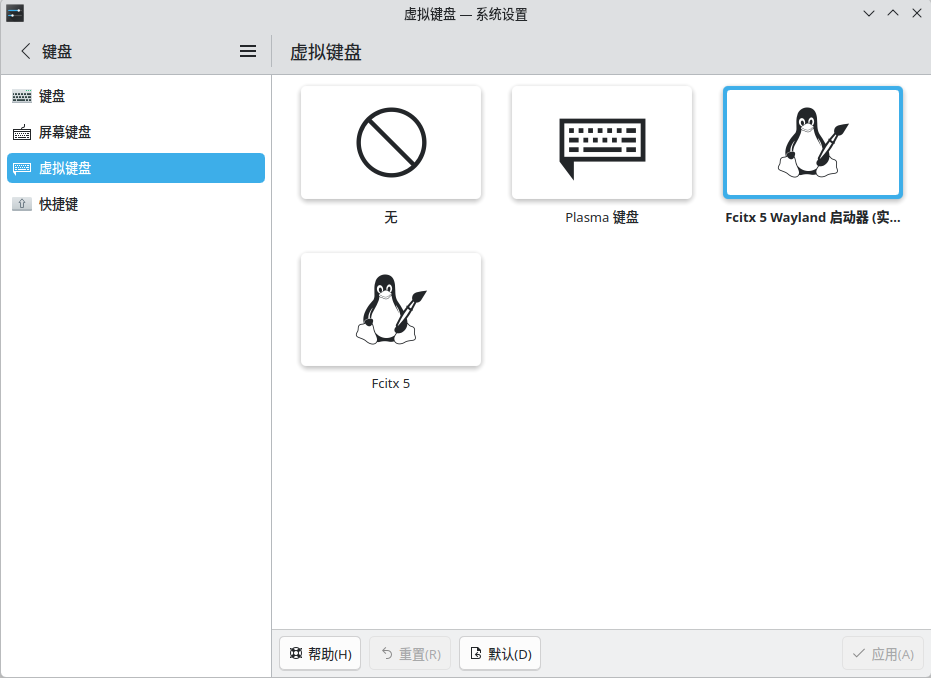
<p>因为是KDE+Wayland, 所以要注意两点。不需要添加环境变量，直接在设置里面选择Fcitx5或者那个实验版本的。</p>
<figure class="post__image"><img loading="lazy"  src="https://yuanux.dpdns.org/media/posts/1/Ping-Mu-Jie-Tu_20260607_141712.png" alt="这就是" width="931" height="678" sizes="(min-width: 920px) 703px, (min-width: 700px) calc(82vw - 35px), calc(100vw - 81px)" srcset="https://yuanux.dpdns.org/media/posts/1/responsive/Ping-Mu-Jie-Tu_20260607_141712-xs.png 300w ,https://yuanux.dpdns.org/media/posts/1/responsive/Ping-Mu-Jie-Tu_20260607_141712-sm.png 480w ,https://yuanux.dpdns.org/media/posts/1/responsive/Ping-Mu-Jie-Tu_20260607_141712-md.png 768w ,https://yuanux.dpdns.org/media/posts/1/responsive/Ping-Mu-Jie-Tu_20260607_141712-lg.png 1024w"></figure>
<p>选择云拼音，然后注销登陆即可。</p>
<h2>3.进阶</h2>
<p>当然，使用Linux了最重要的当然是隐私啦。感谢开源社区的馈赠。</p>
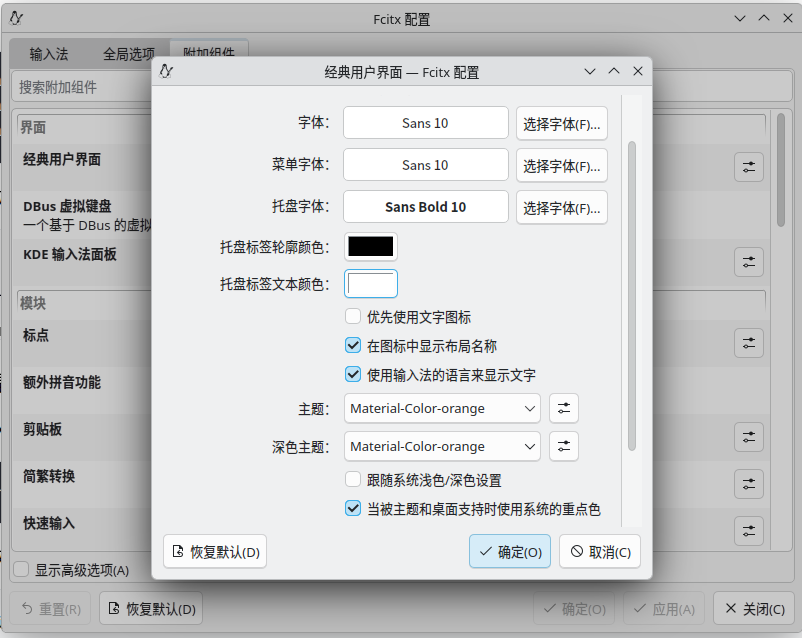
<p>安装Material Color主题：</p>
<p><code>sudo add-apt-repository ppa:hosxy/fcitx5-material-color </code><br><code>sudo apt update </code><br><code>sudo aptinstall -y fcitx5-material-color </code></p>
<figure class="post__image"><img loading="lazy"  src="https://yuanux.dpdns.org/media/posts/1/Ping-Mu-Jie-Tu_20260607_142408.png" alt="在这呢" width="802" height="638" sizes="(min-width: 920px) 703px, (min-width: 700px) calc(82vw - 35px), calc(100vw - 81px)" srcset="https://yuanux.dpdns.org/media/posts/1/responsive/Ping-Mu-Jie-Tu_20260607_142408-xs.png 300w ,https://yuanux.dpdns.org/media/posts/1/responsive/Ping-Mu-Jie-Tu_20260607_142408-sm.png 480w ,https://yuanux.dpdns.org/media/posts/1/responsive/Ping-Mu-Jie-Tu_20260607_142408-md.png 768w ,https://yuanux.dpdns.org/media/posts/1/responsive/Ping-Mu-Jie-Tu_20260607_142408-lg.png 1024w"></figure>
<p>至此大功告成，我也水完一篇了。</p>
            ]]>
        </content>
    </entry>
</feed>